Bodyslide Guide
👚 BodySlide in Licentia NEXT
Licentia NEXT 13.7.0 changed how BodySlide is built. The list no longer asks you to pick groups and batch build by hand - it uses BSBB (MO2 BodySlide Batch Builder), which rebuilds everything from a ready-made config in one click. If you followed this guide before 13.7.0, the old steps (choosing 3BA/HIMBO groups, building Unassigned outfits by hand, a single Bodyslide Output mod) no longer apply.
🤓 How BodySlide is set up in Licentia NEXT
Licentia NEXT uses OBody NG, which gives every NPC a body shape at runtime. Because OBody does the shaping, every mesh BodySlide builds must be neutral - built on a zeroed preset. That's why you should never build the list's outfits with your favourite preset.
| Body | Naked body we use | Preset to build everything with |
|---|---|---|
| Female | CBBE 3BBB Body Amazing | - Zeroed Sliders - |
| Male | HIMBO Body - SOS High Poly Phys CBPC | HIMBO Zero for OBody |
The output is split across four mods, at the very bottom of the MO2 left pane under the Licentia NEXT - Bodyslide Output - Needs to always stay at the end separator:
| Build | Output mod | Body | What it builds |
|---|---|---|---|
| 1 | Licentia NEXT - BO 1 - 3BA - All | Female | Every female outfit reachable through BodySlide groups |
| 2 | Licentia NEXT - BO 2 - HIMBO - All | Male | Every male outfit reachable through BodySlide groups |
| 3 | Licentia NEXT - BO 3 - 3BA - Unassigned | Female | Female outfits whose author put them in no group (Heart of Ice, LotD Dbm outfits, the TRX futa addon, Dismemberment Framework addons, etc.) |
| 4 | Licentia NEXT - BO 4 - HIMBO - Unassigned | Male | The male equivalent |
Next to them sits Licentia NEXT - BSBB Groups config, which holds the slider groups BSBB generates. Don't edit it by hand.
Never put your own files into the four BO mods. Every BSBB build wipes its output mod first, so anything you add there is deleted on the next rebuild. Your own builds go into your own mod - see Part 2.
Part 1 — Re-running the list's BodySlide build (BSBB)
🕐 A full rebuild takes around 5 minutes, and you don't have to click through anything while it runs.
Step 1️⃣ — Close the game
MO2 builds its virtual Data folder when you launch something, so meshes written while the game is running won't be seen until the next launch. Close Skyrim before building.
Step 2️⃣ — Open BSBB
In MO2, click the Tools icon (the puzzle piece in the top toolbar) and select BodySlide Batch Builder.
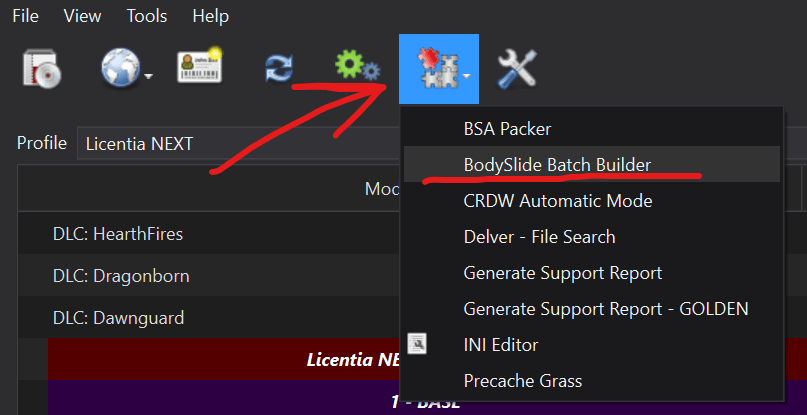
The window would open listing the four builds with their output mod and preset.
The Output and Preset column headers in the BSBB window are swapped - that's a display bug in BSBB itself. The config is fine, don't try to "fix" it.
Step 3️⃣ — Click Build All
In the opened window click Build All at the top right:
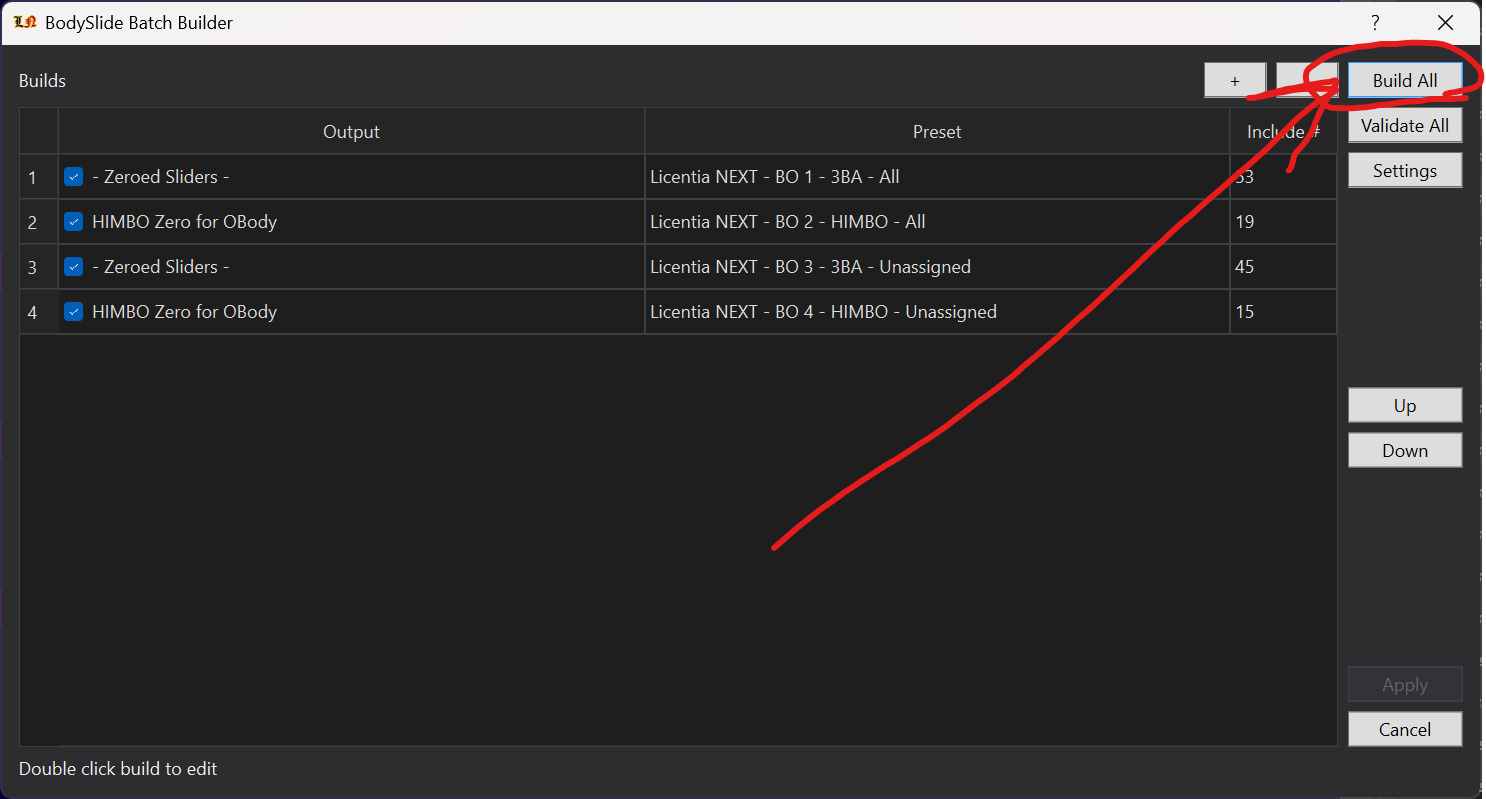
BSBB launches BodySlide (the MO2 executable named BodySlide) once per build, with the right preset and output mod each time, and Build Morphs is always on. BodySlide closes itself after each batch.
- To rebuild only part of it, untick the builds you don't need - but note that the ticked state is saved into the config, so tick them back afterwards.
- If BSBB reports a conflict (two slider sets writing the same mesh) or ignored outfits, it's telling you the config doesn't know how to handle something new - usually a mod you added. Don't build over it; see Part 2.
Step 4️⃣ — Refresh MO2 and start the game
Hit F5 in MO2 when BSBB finishes, then launch the game. That's it! 👑
ℹ️ How the list's rules work (for the curious)
The config lives at <Licentia folder>\plugins\data\bsbb_config.xml. It decides, for every mesh, which slider set builds it - many outfits exist in several versions (physics / no physics, CBBE / 3BA, heels / no heels, old / new conversion), and they all write to the same mesh file.
- Excludes come first. Outfits that belong to another build (a male path in a female build, an amulet owned by a dedicated mod) are removed before anything else.
- Then preferences, top to bottom. When several slider sets want the same mesh, BSBB walks the rules in order and keeps the first match. The order is the whole mechanism - specific rules sit above general ones.
- Female build, in short: specific fixes first (Immersive Armors: Asdasfa's fixes > IAR ports > the old IA conversion), then
CBBE 3BA Vanilla Outfits Redoneand the Creation Club outfits (physics variants preferred), then mod-specific 3BA conversions, then generic3BA/3BBB, and plainCBBEonly as a last resort. No heels variants are preferred. - Male build, in short: specific HIMBO refits first (Immersive Armors, Vigilant, Kaidan, LotD, Wyrmstooth, Creation Club, base game), then the HIMBO bodies,
TNG, andHIMBOas the catch-all. Variants without skirt bones, and theSOS High Polybody, are preferred. - Every mesh is built by exactly one build, so a male build can never overwrite a female mesh and MO2 priority between the
BOmods never has to decide anything.
Some outfits are intentionally left as their authors made them - for example the Thieves Guild armour has no breast physics in CBBE 3BA Vanilla Outfits Redone, and a few outfits (Savior's Hide among them) crumple slightly under large breast sliders because of upstream slider data. Those are known and not bugs in your install.
Part 2 — Building outfits you added yourself
You installed a new armor or outfit mod that ships BodySlide files (CalienteTools\BodySlide\SliderSets\*.osp). BSBB doesn't know about it, so you build it yourself - into your own output mod, which sits below the list's four.
🕐 A couple of minutes per outfit mod.
Step 1️⃣ — Create your own output mod (once)
At the top of the Mod Organizer 2 window, on the icon row next to Profile, click the Wrench and Screwdriver icon and select Create Empty Mod.

Name it however you like, for example [NoDelete] My BodySlide Output.

Adding [NoDelete] before the name keeps the mod when you update the list. After an update it will be disabled and moved to the bottom of the last separator - just move it back into place and enable it.
Drag it to the very bottom of the left pane, below Licentia NEXT - BO 4 - HIMBO - Unassigned, and enable it. Being last means it wins over the list's output - so if your new mod replaces a vanilla outfit the list also builds, yours is what you'll see.
You only need one such mod - reuse it for every outfit mod you add later.
Step 2️⃣ — Open BodySlide from MO2
In the top right of MO2, pick BodySlide from the executables dropdown and click Run.
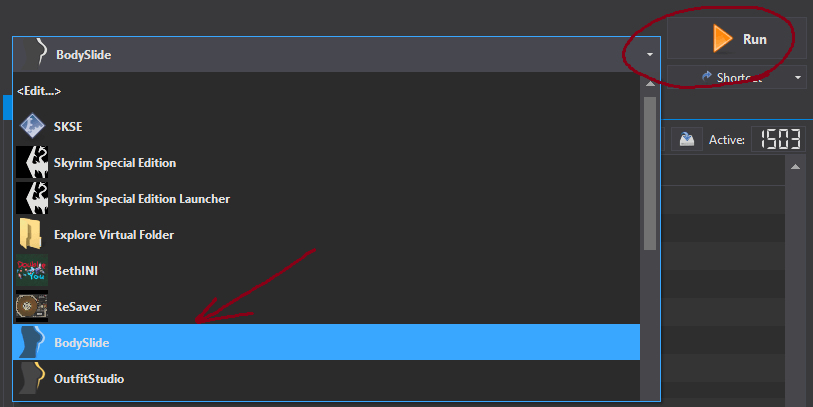
If BodySlide shows missing textures or can't find files, check its game data path (Settings in BodySlide): it must point at your Licentia NEXT Stock Game\Data folder, not the Steam install. Right-click Stock Game\Data in Explorer, Copy as path, paste it there.
Step 3️⃣ — Pick only the new outfits
Use the Filter Outfits search box in the top right to find the slider sets from the mod you added (search for its name, or a word from the outfit names).
Then decide which body they are for - build female and male separately, never together:
- Female outfits are made for
CBBE 3BA(names usually say3BA,3BBBorCBBE). If a mod offers both a3BAand a plainCBBEversion, take the3BAone; if it offers physics and no-physics versions, take the physics one - that's what the rest of the list uses. - Male outfits are made for
HIMBO(names usually sayHIMBO). - An outfit made for a body we don't use (
UNP,BHUNP,CBBE SEwithout 3BA,SOS/SAM Light, …) won't fit - get the3BAorHIMBOversion of the mod instead.
Step 4️⃣ — Choose the matching preset
From the preset dropdown at the top:
- Female:
- Zeroed Sliders - - Male:
HIMBO Zero for OBody
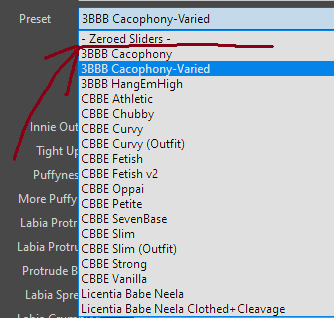
Always a zeroed preset. OBody applies body shapes in game on top of the mesh. Build with any other preset and those outfits will look inflated or mismatched against everything else.
Step 5️⃣ — Batch Build into your own mod
At the bottom left, tick Build Morphs (required - OBody needs the morph files) and the checkbox next to the preview.

- Hold
Left CTRLand clickBatch Build- holding Ctrl is what lets you choose where the files go. - Check the list of outfits that pops up - only the ones you meant to build should be ticked - and click
Build. - A folder picker opens. Go to your Licentia NEXT folder, then
mods, and select your own output mod from Step 1️⃣. - If BodySlide asks you to choose between variants that write the same file, pick the one that matches Step 3️⃣ (3BA over CBBE, physics over no physics).
If the new mod has both female and male outfits, now repeat Steps 3️⃣ to 5️⃣ for the other body with its own preset, into the same output mod.
Step 6️⃣ — Refresh MO2 and check in game
Close BodySlide, hit F5 in MO2, and make sure your output mod is enabled and still at the very bottom. Done! 👑
You don't need to re-run the list's BSBB build after adding an outfit - your mod is separate and survives every BSBB rebuild. The only time to re-run BSBB is when you want the list's own output refreshed (Part 1).
ℹ️ Troubleshooting
-
The outfit is invisible in game. It wasn't built, or it was built to the wrong place. Check that your output mod contains the mesh (right-click it in MO2 →
Open in Explorer) and that it's enabled and at the bottom. -
The outfit looks shrunk, inflated, or clips through the body. Wrong preset (not zeroed),
Build Morphswasn't ticked, or you built a female outfit for a male body (or the other way round). Rebuild it with the right preset and Build Morphs on. -
The outfit is invisible in first person only. Some conversions have a mesh transform problem that only shows with Improved Camera. It's a mesh issue in the outfit mod, not your build - report it to that mod's author.
-
BSBB (Part 1) now reports a conflict or ignored outfits. A mod you added shares a mesh or a slider-set name with the list. Build your mod the Part 2 way and leave the list's config alone - or, if you know what you're doing, add a rule for it in
bsbb_config.xml.
If you have any further questions or problems, stop by the Licentia Next category in Vermi's Hub Discord Server and we can help you work them out!
♻️ Removing OBody from your installation
If you want to remove OBody and have one fixed body for everyone:
- Disable OBody in MO2: under the
BODIESseparator (or search forOBody), untickOBody Next Generationand the ORefit masterlist, and underBody Meshes (and physics)the two3BA with OBody Collision Physics Fixpatches. - Open BSBB (Part 1, Step 2️⃣), double-click each build to edit it, and change its preset to the one you want (female builds 1 and 3, male builds 2 and 4).
- Click
Build All.
Outfits you built yourself in Part 2 need rebuilding with the same preset too.